bare-max/claude-fable-5 / tier-1-mug
success tier 1
bare (claude fable 5)
render
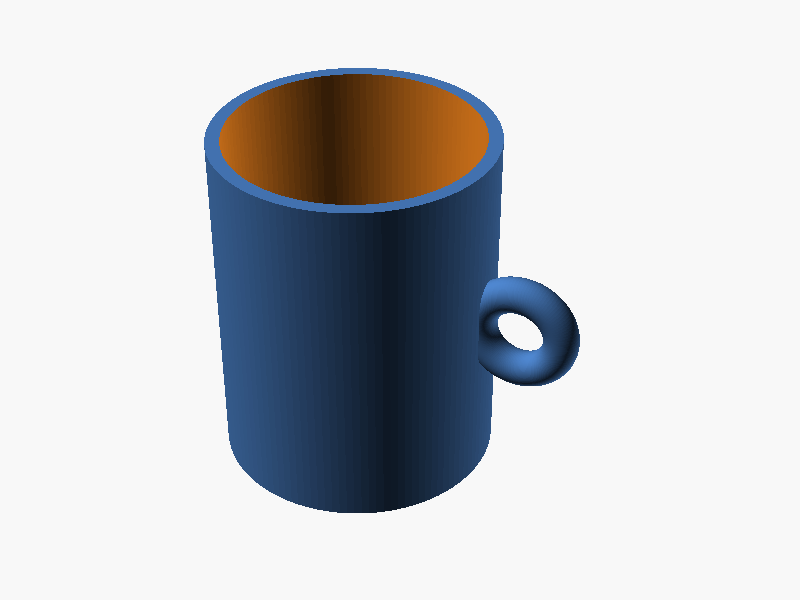
// =====================================
//  マグカップ (OpenSCAD)
// =====================================

$fn = 120;            // 円の滑らかさ

// ---- カップ本体のパラメータ ----
outer_d  = 80;        // 外径 [mm]
cup_h    = 100;       // 高さ [mm]
wall_t   = 4;         // 側面の肉厚 [mm]
bottom_t = 6;         // 底面の厚み [mm]

// ---- 取手のパラメータ ----
handle_r      = 12;                         // リング(取手)の半径 [mm]
handle_tube_r = 5;                          // リング断面(握り)の半径 [mm]
handle_z      = cup_h / 2;                  // 取手の中心高さ(カップ中央)
handle_cx     = outer_d/2 + handle_r - 2;   // リング中心のX位置(壁に少し食い込ませて接合)

// ---- トーラス(リング)モジュール ----
// R: リング中心円の半径, r: 断面円の半径
module torus(R, r) {
    rotate_extrude(convexity = 10)
        translate([R, 0, 0])
            circle(r = r);
}

// ---- マグカップ全体 ----
difference() {
    union() {
        // カップの外形(円柱)
        cylinder(d = outer_d, h = cup_h);

        // 取手:縦向きのリングを側面外側に接合
        translate([handle_cx, 0, handle_z])
            rotate([90, 0, 0])              // リングを垂直(XZ平面)に立てる
                torus(handle_r, handle_tube_r);
    }

    // 内側のくり抜き(底を bottom_t 残し、上面まで貫通)
    translate([0, 0, bottom_t])
        cylinder(d = outer_d - 2 * wall_t, h = cup_h);
} パラメータ (6) —
スライダを動かすと openscad-wasm で再レンダリング
prompt
OpenSCAD で、外径 80mm、高さ 100mm、肉厚 4mm のマグカップを作ってください。
底面の厚みは 6mm とし、内側はくり抜いて飲み物を入れられる形状にしてください。
さらに、側面には外径方向に飛び出す半径 12mm の取手(リング状の取手)を付けてください。
取手はカップの中心高さあたりに付け、外周から十分にはみ出して指を通せる形にしてください。

完成したコード全体を ```openscad ... ``` のフェンスで囲んで出力してください。コードのみで、追加の説明は不要です。