tier-3-butt-hinge / openai/gpt-oss-20b
1 run / 累計 10.7s / 累計 $0
openai (self-hosted) gpt-oss-20b bare
bare (provider default effort)
run detail → render
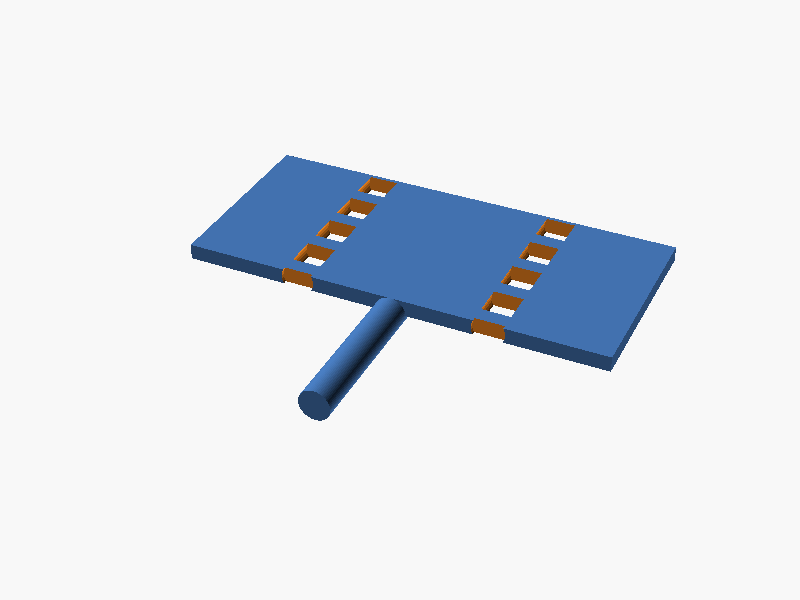
// Parameters
leaf_w   = 30;      // Width along Y (pin axis)
leaf_h   = 25;      // Height along X
leaf_t   = 2;       // Thickness along Z
pin_d    = 4;
pin_l    = 32;
knuckle_d = 8;
hole_clearance = 0.3;
hole_d = pin_d + hole_clearance;     // 4.6 mm

// Knuckle positions (Y)
knuckle_y = [-12, -6, 0, 6, 12];

// Plate holes positions (pitch 8mm along Y)
plate_y = [-12, -4, 4];   // 3 holes per leaf

module leaf(side) {
    // side: -1 for left, +1 for right
    x_offset = side * (leaf_h/2);
    translate([x_offset, 0, leaf_t/2])
        difference() {
            cube([leaf_w, leaf_h, leaf_t], center=true);

            // Pin holes at knuckle positions
            for(y=knuckle_y) {
                translate([0,y,0])
                    rotate([90,0,0])   // hole along Y axis (pin direction)
                        cylinder(h=leaf_t*2, r=hole_d/2, $fn=32);
            }

            // M3 plate holes on opposite side of leaf
            for(y=plate_y) {
                translate([x_offset*sign(side)*1.5,y,0])   // offset slightly into leaf
                    cylinder(h=leaf_t+2, r=3.2/2, $fn=32);
            }
        }
}

module pin() {
    rotate([90,0,0])  // align along Y axis
        cylinder(h=pin_l, r=pin_d/2, $fn=64);
}

// Assemble in 180° open state (both leaves coplanar)
union() {
    leaf(-1);   // left leaf
    leaf(1);    // right leaf
    pin();      // shared pin axis
} パラメータ (7) —
スライダを動かすと openscad-wasm で再レンダリング
prompt
OpenSCAD で、家具用の小型バット蝶番(butt hinge)を作ってください。
3 つのパーツ(左板、右板、ピン軸)が組み合わさって動作する完成品を、
「開いた状態(180°)」で 1 つの SCAD ファイルに配置して出力します。

寸法と配置:
- 板(leaf)2 枚: 30mm × 25mm × 厚さ 2mm の鉄板形状
  - 縦 30mm の辺がピン軸に沿う(ヒンジ軸方向)
  - 横 25mm の辺が回転で開く方向に伸びる
- ピン軸: 直径 4mm の円柱、長さ 32mm(両端 1mm ずつ knuckle から飛び出す)
- knuckle(筒部): 縦 30mm を 5 等分(各 6mm)に区切り、左板に 3 個・右板に 2 個を
  互い違いに配置(左板は外側 2 個 + 中央 1 個、右板は中間 2 個)
- knuckle 外径 8mm、内径はピン軸 + 0.3mm クリアランス(= 4.6mm 穴)
- 左板と右板はピン軸を共有して回転可能。180° 開いた状態で、両板の
  平らな面が同一平面に来るように配置する
- 各板の knuckle から離れた側に、M3 用の皿穴を 3 個ずつ
  (穴ピッチは板の縦方向に 8mm 間隔、皿穴は表面から見て直径 6mm × 深さ 1mm
  のテーパ + 直径 3.2mm の貫通穴)

座標系:
- ピン軸の中心線を Y 軸に重ねる(ピン軸は +Y 方向)
- 板の平らな面は Z 軸に直交し、左板が x<0 側、右板が x>0 側に伸びる(180° 開)
- knuckle は X=0 を中心とし、Y 方向に 6mm ずつ並ぶ

完成したコード全体を ```openscad ... ``` のフェンスで囲んで出力してください。
コードのみで、追加の説明は不要です。